Changelog

What shipped, and when.Every change, dated.

New features, improvements and fixes in Highseat, newest first. Each entry has its own page.

AllDashboardDataDevelopersInstallRevenueSharing
  • Developers
Terminal
curl https://api.highseat.com/v1/sites/example.com/pages?limit=5 \  -H "Authorization: Bearer hs_live_…"

The stats API moves to api.highseat.com

The stats API now has a host of its own. Every endpoint sits under https://api.highseat.com/v1, and every call is a read: a GET that answers JSON.

Create a key in Workspace settings, API keys. A key reads every site in the workspace, sites added later included, or only the ones you pick, and it belongs to the workspace, so it keeps working when the member who made it leaves.

What you can read

Each site answers on its domain or its id. Ask for the overview figures, a time series, or a breakdown of pages, sources, devices, locations, campaigns, bots, events, goals or revenue. Realtime and funnels have endpoints too.

A breakdown pages with a cursor. Pass the nextCursor of one answer as cursor to get the next, up to 500 rows a page. A key can make 600 calls an hour, and every answer says how many are left in its RateLimit headers.

The spec is at https://api.highseat.com/v1/openapi.json, and an agent can read https://api.highseat.com/v1/llms.txt.

Improvements

  • A new API key shows the base URL beside it, ready to copy.
  • GET /v1/usage reports the workspace's events this period, its plan's limit and the projection to the end of the period, and it answers even while the workspace is locked.
  • The docs have an API Reference tab with a page for every endpoint, generated from the OpenAPI spec, and a playground that sends real requests.

Fixes

  • The old /api/v1 paths on the dashboard's own origin are gone. Point every call at https://api.highseat.com/v1.
  • Install
  • Developers
app/layout.tsx
import { Highseat } from "highseat/next"export default function RootLayout({ children }: { children: React.ReactNode }) {  return (    <html lang="en">      <body>        {children}        <Highseat site="YOUR_SITE_ID" />      </body>    </html>  )}

Pick your platform, see only its install steps

Adding a site now starts with one question: what is the site built on? Pick from ten platforms, or Any other site, and Highseat shows only the steps for that one.

Ten platforms, three groups

The picker sorts platforms by how the site is built. Website builders such as Webflow, Framer, Squarespace, Wix, Shopify and WordPress take one tag in their header settings or theme. Next.js, React and TanStack Start install the package, and Astro takes a script tag in its layout. Any other site covers the rest, and typing a name filters the list.

One package for frameworks

Next.js, React and TanStack Start sites install highseat and render <Highseat /> once, in the root layout. The package loads the tracker from Highseat or from your own proxy path. A call made before the tracker loads waits for it, and no call ever throws.

Terminal
npm install highseat

The same code everywhere

Onboarding, Installation settings and highseat.com/skill.md read every snippet from one source, so a coding agent follows the same steps you see. A test fails when the dashboard shows code the package README does not.

Improvements

  • Installation settings show when the first pageview arrived and when the proxy last sent an event.
  • highseat.com/skill.md gives a coding agent the same install steps to follow.

Fixes

  • Deleting a site or a user now removes every stored event. A failed erasure can be retried.
  • Bot traffic reclassified after the fact no longer counts toward a plan's events.
  • Developers

Identify signed-in users with a prop or a hook

Pass the signed-in user's id to <Highseat /> and the package calls identify() whenever it changes. null means signed out, so a sign-out or an expired session clears the id.

app/layout.tsx
<Highseat site="YOUR_SITE_ID" userId={user?.id ?? null} />

From a hook

When the session comes from a client hook, call useIdentify() in any component instead. The root layout never reads the session, so a Next.js layout can stay static.

components/identify-user.tsx
"use client"import { useIdentify } from "highseat/next"import { useSession } from "~/lib/auth-client"export function IdentifyUser() {  const { data, isPending } = useSession()  useIdentify(isPending ? undefined : (data?.user.id ?? null))  return null}

undefined means the session is still loading and changes nothing. null means signed out and clears the id.

Improvements

  • In development, the package logs every track() and identify() call to the console, and warns once per page when no tracker script loaded. Pass debug to turn it on or off anywhere.
  • An identified user id is kept in the browser for 13 months from the day it was set, then dropped. Identifying again with the same id doesn't extend it.

Fixes

  • Funnels count a visitor's steps before and after identify() as one person.
  • Sign-in and checkout hosts such as accounts.google.com and checkout.stripe.com fold into Direct instead of showing as sources.
  • Revenue in Icelandic króna, Ugandan shillings and Malagasy ariary is stored at the right scale, from Stripe and from Polar.
  • Developers
  • Install
app/api/highseat/route.ts
import { createProxy } from "highseat/next"const proxy = createProxy({ clientIp: "vercel" })export { proxy as GET, proxy as POST }

The highseat package, with a proxy on your own domain

npm install highseat gives a site everything it needs to talk to Highseat, typed. Render <Highseat /> from highseat/react or highseat/next, or call inject() anywhere else. track() knows the built-in events, such as signup and purchase. Declare your own events, and in strict mode a misspelt event name fails the type check.

Calls made before the tracker loads wait for it, and no call ever throws.

A proxy on your own path

createProxy() serves the tracker and forwards events from a path on your own domain, so a filter list that blocks Highseat's host doesn't block your site. It passes on each visitor's IP under your site secret, which keeps countries right, and Highseat drops the IP once it has looked up the country.

In Next.js, one route file holds the proxy and withHighseat() in next.config.ts points your proxy path at it. highseat/proxy has the same handler for any runtime with fetch, with guides for TanStack Start, Cloudflare Workers and Pages, Netlify, Vercel, Astro, Hono and nginx. Every test runs on Node, Bun and Cloudflare's workerd.

Improvements

  • Server-side events sent with your site secret count as visits instead of being dropped.
  • A 404 counts once per page path, and it is sent the moment the page loads.
  • Sharing
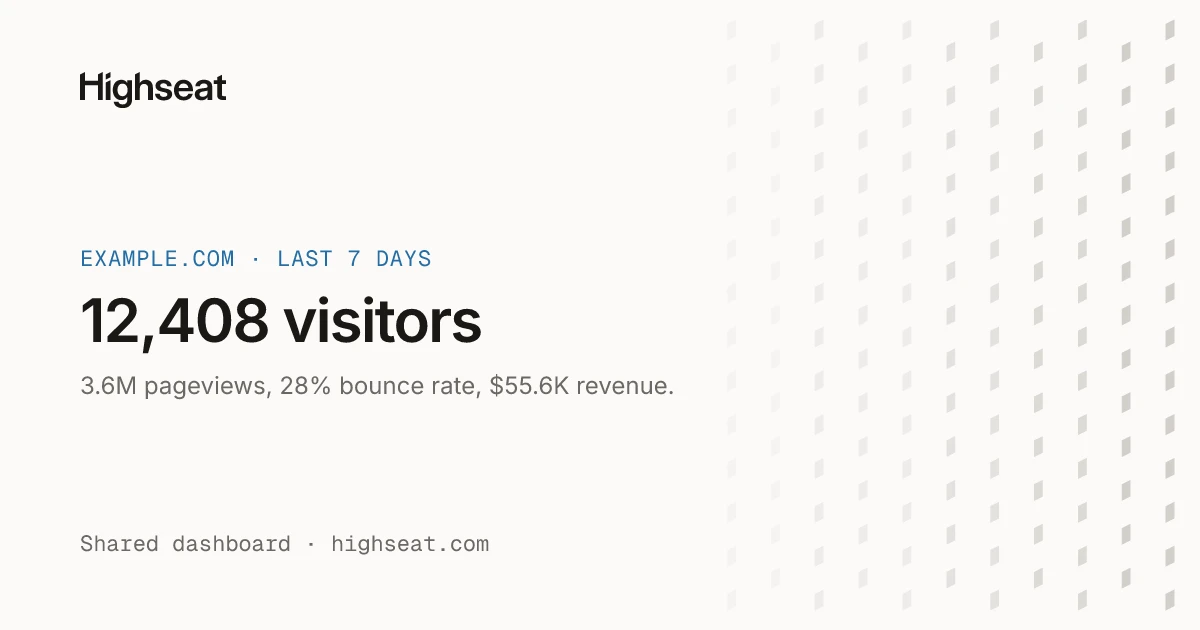
The preview card of a shared dashboard link: example.com over the last 7 days, 12,408 visitors, 3.6M pageviews, 28% bounce rate and $55.6K revenue.

Share links show a preview when you paste them

Paste a shared dashboard link into Slack, X or iMessage and it opens into a card: the site, the period, and its visitors, pageviews, bounce rate and revenue.

Revenue appears only when the link shows it. A link behind a password names the site and no figure.

Fixes

  • The dashboard serves flags, browser logos and favicons itself, so no third party sees who views it.
  • Traffic from HostRoyale's data centres now counts as bots.
  • Server-side calls from Node, Bun and other backends count when they send the site secret, instead of being dropped as crawlers.
  • Data

Import your Plausible history

Upload a Plausible export from a site's Data settings, and its daily totals show up in your reports next to the events Highseat collects.

One site can hold several imports. Each skips the days the site already tracked or imported, so overlapping exports never count the same day twice.

Improvements

  • Exclude IP addresses and paths in site settings. Matching events are dropped at ingest, and one click adds your own IP.
  • Dashboard
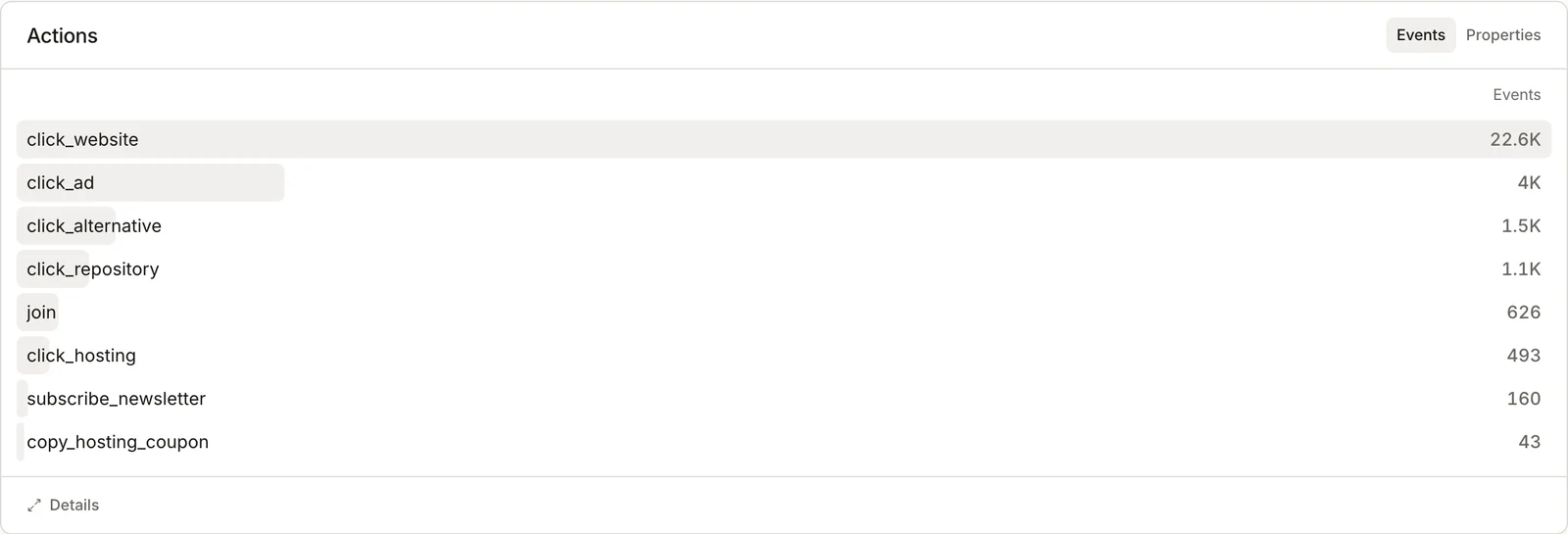
The Actions card on the OpenAlternative dashboard: custom events such as click_website and subscribe_newsletter, each with its count.

Goals, events and properties in one Actions card

The dashboard now has one Actions card where three used to sit. Its Goals tab shows each goal's visitors, conversions and rate. Events lists every custom event, and Properties breaks an event down by the values it was sent with.

Click an event and the card filters the dashboard to it and opens its properties. Click a goal and every card shows the traffic that converted. The Goals tab appears once a site has its first goal.

Goals from pages or events

Add a goal in a site's Goals settings. A page goal takes a path, and * is a wildcard: /docs/* counts every page under /docs. An event goal takes the exact event name. Both suggest the site's own pages and events as you type.

Improvements

  • Goal and event rates count server-side visitors and leave out orders that arrive by payment webhook.
  • Dashboard

Search, sort and list every site you track

All sites now has a search field, a sort menu and a choice of grid or list. Press / to search. Every word you type has to appear in a site's name or domain, so docs acme finds docs.acme.com.

Sort by oldest or newest first, or by name in either direction. The list view puts each workspace in its own table, with the last 24 hours' visitors, the change against the 24 hours before, a sparkline, who is online and the date each site was added. Highseat remembers both choices.

On a phone the page keeps its cards, which fit a narrow screen better than a table.

Improvements

  • Site cards show exact visitor counts instead of rounded ones.
  • Your own workspace comes first, then the others by name, and an empty workspace shows a New site tile.
  • The site switcher follows the order you pick on All sites.
  • Every figure follows your browser's language, so a złoty amount reads 28,8 tys. zł in Polish and PLN 28.8K in English.
  • Invite teammates as an Owner, Admin or Viewer, and leave a workspace from its Members page.
  • Change your photo, name and email from Account, Profile. A new email applies once you open the link sent to it.
  • Install

Onboarding that waits for your first visitor

Adding your first site now walks you through it. Name the site, add the snippet, and open your site in a new tab. The install step watches for your first pageview and switches to Now tracking the moment it lands, with where that first visitor came from, their browser and the page they opened.

You can skip to the dashboard at any point.

Improvements

  • A site that has never reported opens its dashboard on the install steps.
  • When events arrive from a host the site doesn't count, the install step names it, says how many came, and offers to allow it.
  • Add more hostnames to a site in General settings. *.example.com counts example.com and every subdomain.
  • Data

Erase one user's data, or a whole workspace

A site's Data settings have a Deletion card. Enter the user id your site sent with identify(), and Highseat removes every event recorded for that user, with the rest of each of their visits, anonymous pageviews from before they signed in included. The confirmation names how many events and visits go before anything is deleted.

The rows leave every report at once. Revenue on them goes too, and attribution credit is worked out again without them.

The workspace owner can also delete a whole workspace from its General settings, after typing its name. Billing stops, and every site's events, sessions, imports and exports go with it, along with its members and API keys.

Improvements

  • Every card's Details dialog downloads its rows as CSV, and a full raw export of a site arrives by email link when it is large.
  • A workspace that stops paying deletes its sites and their events on day 60, with a notice to the owner a week before. The workspace and its invoices stay.

Start with 14 days free.No card required.