# Highseat changelog
New features, improvements and fixes in Highseat, newest first. Each entry has its own page.
## Share your chart as an image
17 Nov 2026 · Dashboard · https://highseat.com/changelog/share-chart-image
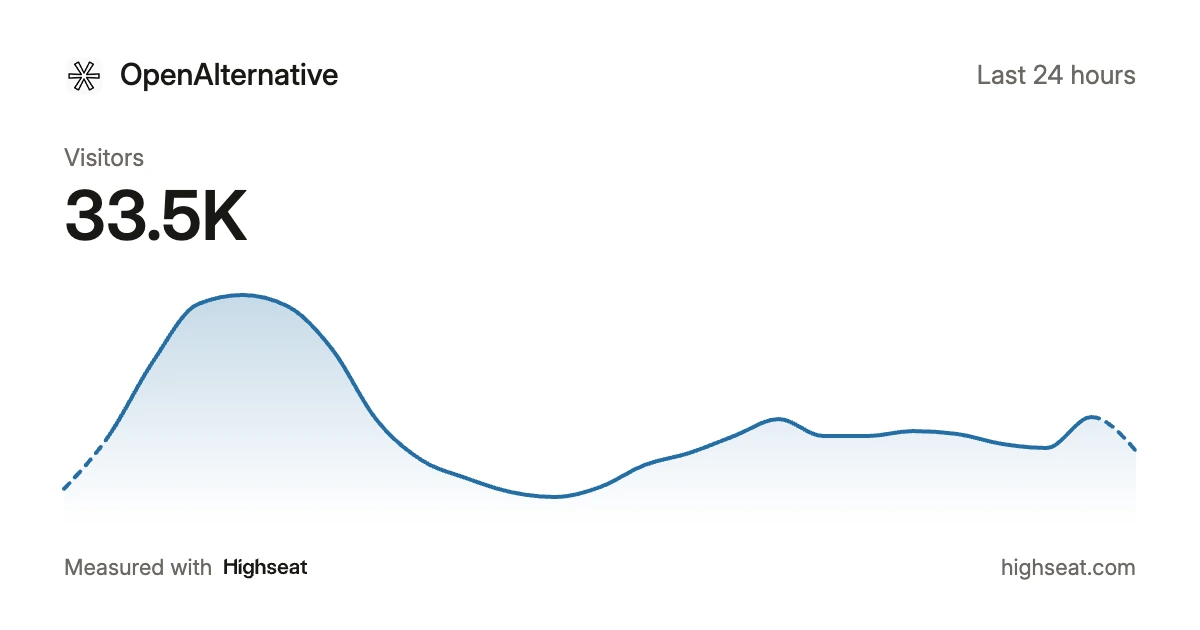
Click **Share** in the dashboard's toolbar, then **Create image…**, to turn the main chart into a picture you can post. The image shows the metric you have selected, its total and the chart for your period, at 1200x630, the size social feeds preview.
Pick light or dark. Turn off the site name or the total if you'd rather not show them. Then download the image, copy it, or post it to X, Bluesky or LinkedIn. Posting opens the network with the text filled in and the image on your clipboard, ready to paste. On a phone, the share sheet sends the image to any app.
The Share menu also holds **Create share link…**, **Embed on your site…** and a link to your site's sharing settings. A teammate with read-only access can still create the image.
**Improvements**
- File downloads are now tracked only once you turn them on. Add `data-downloads` to the script tag, or pass `downloads` to `` or `inject()`, to keep counting them. With downloads off, a link to a file on another site counts as an outbound link.
- A workspace's 14-day trial now starts when it adds its first site, not when the workspace is created. Workspaces whose trial ran out before they added a site have their full trial back.
- Create share link in the Share menu starts from the filters on screen. You can remove any of them before you save the link.
- The bot hits dialog shows the views kept beside the bot hits excluded, and groups the reasons by the check that caught them.
- Every card on the dashboard now updates while the range is still taking events, so the page and source lists match the totals above them.
- The Realtime page says when it last updated, and warns you once updates have stopped.
- The installed app opens like an app. It reopens your last site and shows an offline page without a connection.
- Every page has one header with a back link, and the toolbar fits on one row on a phone.
- In-app browsers such as TikTok, Snapchat and Bing show their app's icon in the browser list.
- An app connected through OAuth stays connected for 90 days without use.
**Fixes**
- Old Chrome, Edge and Firefox versions that bots pretend to run are now dropped as bot traffic, so your visitor counts may dip slightly.
- A revenue total filtered with "is not" counts each order once.
- A comparison of a range that ends now keeps the time of day, so today until 3pm compares with yesterday until 3pm.
## Call the API from TypeScript
9 Nov 2026 · Install & API · https://highseat.com/changelog/typescript-api-client
`stats.ts`
```
import { createApi } from "highseat/api"
const api = createApi({ token: process.env.HIGHSEAT_API_KEY })
const { data } = await api.getOverview({ site: "example.com", period: "30d" })
for await (const row of api.paginate.getPages({ site: "example.com" })) {
console.log(row.path, row.visitors)
}
```
`highseat/api` is a typed client for the Highseat API. Every endpoint is a method named after what it does, such as `getOverview()`, `getPages()` or `createNote()`. Its parameters and its answer are typed from the API itself, so your editor completes them and a wrong parameter fails to compile.
A list comes back in pages. `api.paginate` walks every page for you in a `for await` loop, and `.toArray()` collects them all.
The client handles the API's limits too. When the API refuses a call and asks for a wait of a few seconds, the client waits and tries once more. Every create carries an idempotency key, so that second try never creates a second row.
It uses plain `fetch` and has no dependencies, so it runs in Node.js, Bun and Cloudflare Workers. Update the `highseat` package to 0.10.0 or later to get it.
## Connect Claude to Highseat by signing in
5 Nov 2026 · Install & API · https://highseat.com/changelog/connect-by-signing-in
`Terminal`
```
claude mcp add --transport http highseat https://mcp.highseat.com/mcp
```
An app that speaks MCP can now connect to Highseat with nothing but the server URL. Add `https://mcp.highseat.com/mcp` to Claude, Cursor or another client, sign in, and choose the workspace, the sites it may reach and what it can do. There is no key to copy.
A connection reads by default. An owner or admin can also let it make changes, as a write API key does.
Your connected apps are listed in Workspace settings, under API keys. Disconnecting one stops it within a minute, and a connection also stops when the person who made it leaves the workspace.
## Import your DataFast history
5 Nov 2026 · Data · https://highseat.com/changelog/datafast-import
Paste a website API key from DataFast into a site's Data settings, and Highseat reads your history through DataFast's API. It fills in every day before your first tracked one: totals, pages, sources, locations, devices, browsers, operating systems and goals.
Days the site already tracked or imported are skipped, so nothing counts twice. A year of history takes about 1 hour 10 minutes and runs in the background. The key is stored encrypted during the import and deleted when it ends.
DataFast's breakdowns hold visitors alone, so a filtered report shows visitors for those days, with no sessions, views or bounce rate. Revenue stays in DataFast.
History that DataFast imported from Plausible comes back only as totals, countries, browsers and operating systems. If you still have the Plausible export, upload it first, and the DataFast import skips those days.
**Improvements**
- Bounce rate and session time read "–" in the stats above the chart and in the tables when no session counts.
- In the public API, `bounceRate` and `avgDuration` are `null` when no session counts, so check that your code handles it.
## Put a chart or a single number on any page
4 Nov 2026 · Dashboard · https://highseat.com/changelog/widget-embeds
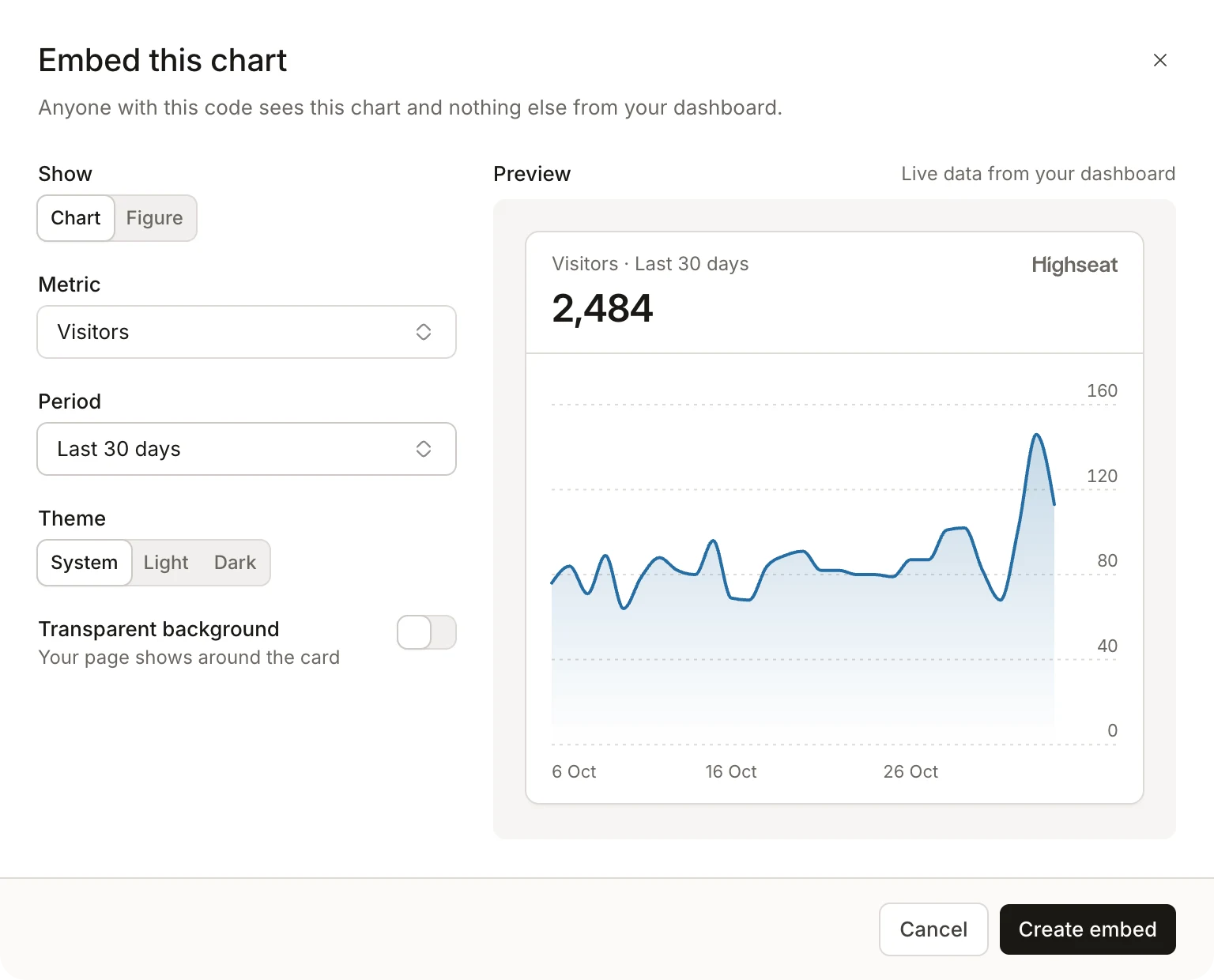
Show your traffic on your own site: a public stats page, an advertise page, a line in your footer. Click **Embed…** in the dashboard's toolbar, pick the main chart or a single figure, choose the metric and the period, and copy the code. A figure can be visitors, views, revenue or who's online now.
The card reads live data and fits itself to your page, in light or dark. Last 30 days stays the last 30 days, so it moves with the calendar and matches your dashboard.
Each embed has its own link, and that link shows the one chart or figure you picked. Anyone reading your page's source gets that card and nothing else from your dashboard. Filters you've set carry over, so a chart can show one country or one campaign.
Your embeds are listed in a site's Sharing settings. Delete one and it disappears from every page that shows it. The [embed guide](https://highseat.com/docs/embed) has the details.
**Improvements**
- A dashboard embedded from a share link now sizes its frame to fit, so your page shows no second scrollbar and no empty space.
- Embeds take a transparent background, so your page's own colour shows through.
## Revenue from Stripe payments outside Checkout
2 Nov 2026 · Revenue · https://highseat.com/changelog/stripe-payments-outside-checkout
A payment taken with Stripe Elements, or a PaymentIntent your own code confirms, now counts as revenue. Highseat waits about ten minutes before recording it, so a payment that also belongs to a Checkout session or an invoice is never counted twice. The PaymentIntent's description becomes the product name.
A webhook connected earlier needs one more event. Open the endpoint in the Stripe Dashboard and add `payment_intent.succeeded`. The URL and the signing secret stay the same.
**Improvements**
- Drag a funnel's steps or a report's series to reorder them.
- An install card that waits for the first pageview says when your own browser is blocking the tracker, so you know the install may be fine.
**Fixes**
- A property filter on event counts, goals and the chart counts only the events that carried the value, not every event of a session that had one.
## Put your sites in your own order
31 Oct 2026 · Dashboard · https://highseat.com/changelog/site-order
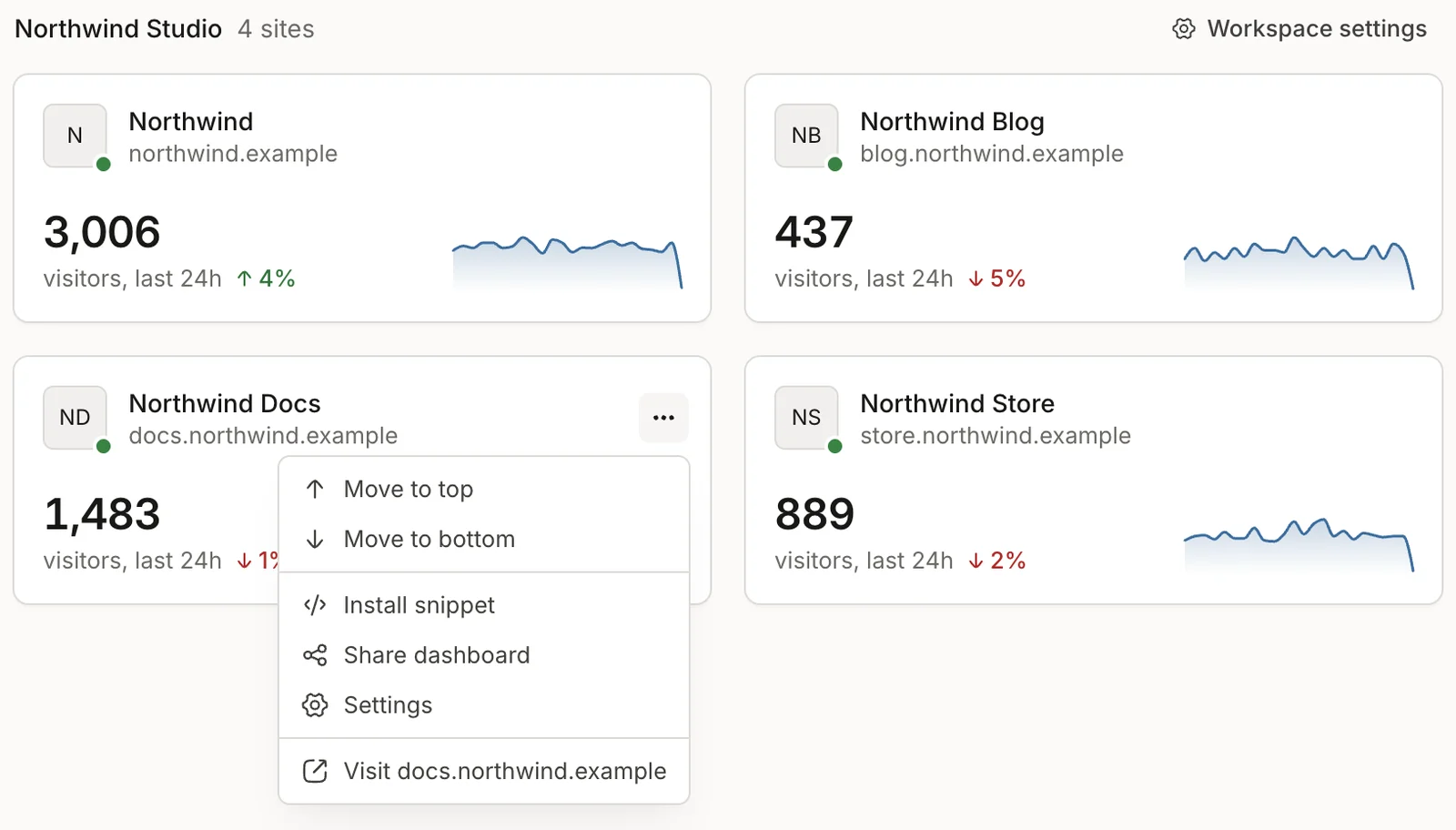
Drag a site on All sites to where you want it, in the card grid or the list. The order is yours alone: other members of the workspace keep their own. A site's `•••` menu has Move to top and Move to bottom too.
The site switcher follows the same order, and keys 1 to 9 open your first nine sites from anywhere in the app.
**Improvements**
- The date picker has a Show by switch, so a chart reads by hour, day, week or month. Press `B` to change it.
- A funnel draws its steps as bars, with the ribbon one switch away.
- A saved list report can rank by an event property.
- A consumer on a paid plan can withdraw from the contract within 14 days on the Billing page, and gets back the unused days.
## See which AI assistants use your MCP server
30 Oct 2026 · AI, Dashboard · https://highseat.com/changelog/assistants-page
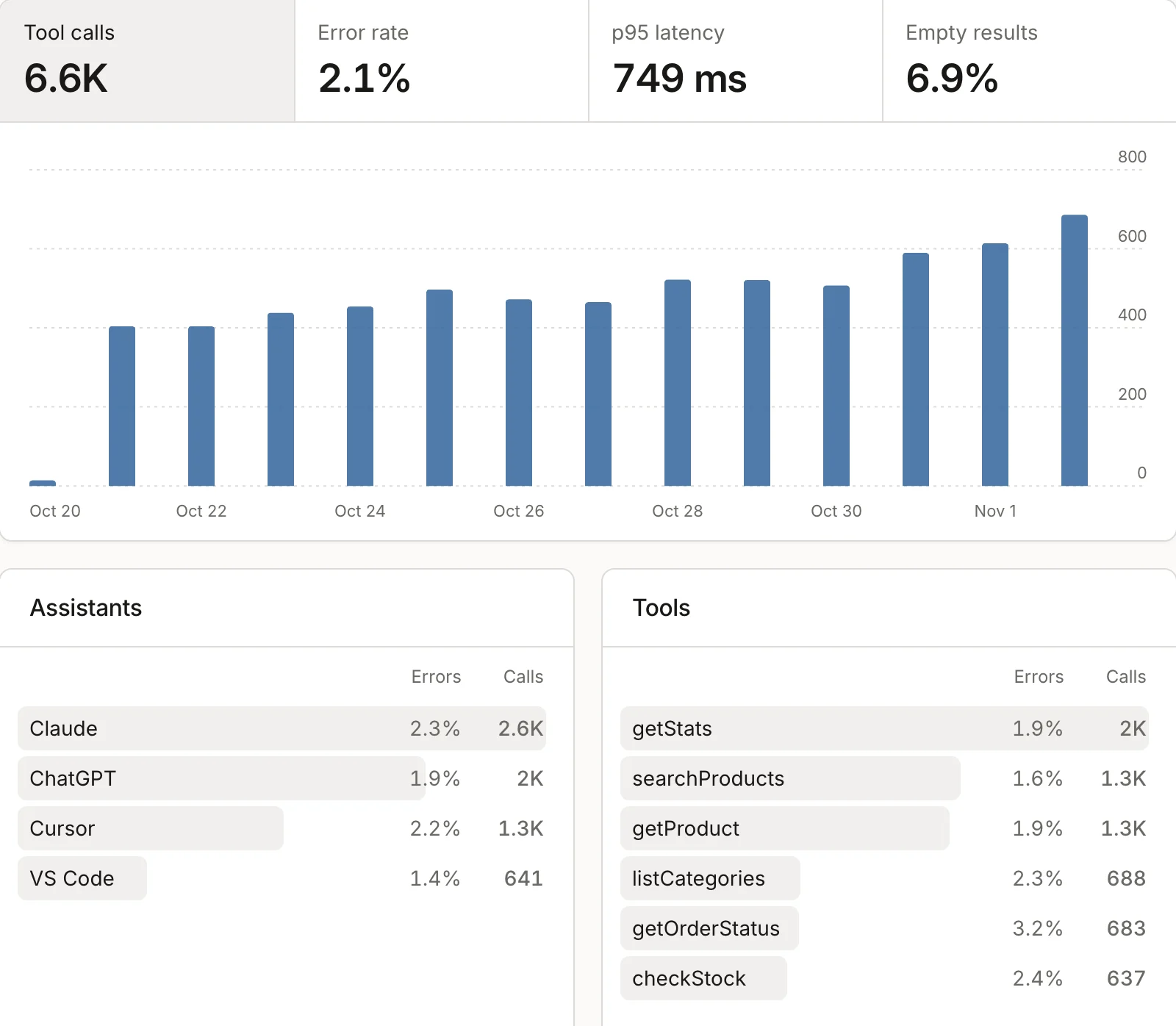
If your site runs its own MCP server, assistants like Claude and ChatGPT call its tools to answer their users. The new Assistants page shows those calls: how many, how many failed, how long they took and how often a tool found nothing. Below that, calls are split by assistant and by tool.
To record them, update the `highseat` package to 0.6.0 or later and call `trackToolCalls(server)` from `highseat/mcp` once, before you register any tool. It works with servers built on the MCP TypeScript SDK v2. Tool arguments, results and the caller's IP address never leave your server.
A call counts as an event on your plan, never as a visitor.
### Visits that assistants send
`mcpLink(url, context)` tags a link a tool returns with `utm_source` and `utm_medium=mcp`. Highseat reads those visits as the AI channel, so the goals and revenue that follow belong to that assistant. The Sources card at the bottom of the page lists them.
## Track events from your backend
27 Oct 2026 · Install & API · https://highseat.com/changelog/highseat-server
`route.ts`
```
import { track } from "highseat/server"
export async function POST(request: Request) {
const user = await createAccount(request)
track("signup", { plan: "pro" }, { request, userId: user.id })
return Response.json(user)
}
```
`highseat/server` records events from your own code: a server action, a route handler, a webhook handler or a job. An event that never reaches the browser now reaches your dashboard, and an ad blocker can't stop it.
`track()` takes the same names and properties as in the browser, typed the same way. Pass the request you are handling, and the event gets the visitor's country and device from it. Pass a `userId` and it counts as that user.
Set `HIGHSEAT_SITE` and `HIGHSEAT_SECRET` from your site's Installation settings on the server. `track()` returns at once and never throws. Events go out in batches, retry on their own, and carry an id, so a retried batch is stored once. In a serverless function, pass `waitUntil` so the send outlives the response.
Update the `highseat` package to 0.5.0 or later to get it.
**Improvements**
- `beforeSend` changes or drops each event in the browser before the tracker sends it. Return `null` to drop one.
- The tracker no longer measures scroll depth, which no report read, so it's lighter on every page and down to 2,894 bytes gzipped.
- Goals and the Events card count people by user id, as funnels do, so one person on two devices counts once.
**Fixes**
- The query parameters to keep setting is gone. Only the raw export read those values, so Highseat now drops every query string.
## Make changes through the API
27 Oct 2026 · Install & API · https://highseat.com/changelog/write-api
`Terminal`
```
curl https://api.highseat.com/v1/sites/example.com/goals \
-H "Authorization: Bearer hs_live_…" \
-H "Idempotency-Key: 7f3c2a10-3f4e-4b7e-9d21-1c6a0e5b8f42" \
-H "Content-Type: application/json" \
-d '{"name":"Signup","type":"event","match":"signup"}'
```
The API used to read only. A write key can now make the changes an admin makes in the dashboard: create sites, change their settings, and manage goals, funnels, saved reports, chart notes and share links. It can also start a raw export.
Choose a key's access when you create it in Workspace settings, API keys. Every key made before writes existed stays a read key. Give a script a write key only when it changes something, and limit it to the sites it changes.
Send an `Idempotency-Key` header with a `POST` to make a retry safe. For 24 hours, a retry with the same key and the same body writes nothing and answers what the first call did.
## Ask an AI assistant about your stats
24 Oct 2026 · AI, Install & API · https://highseat.com/changelog/mcp-server
`Terminal`
```
claude mcp add --transport http highseat https://mcp.highseat.com/mcp \
--header "Authorization: Bearer hs_live_…"
```
Highseat now runs an MCP server, so Claude Code, Cursor, Claude Desktop or another MCP client can read your stats. Ask "What were my top referrers last week for example.com?" and the assistant answers from the same reports as the API.
Connect it with an API key from Workspace settings, API keys. The assistant sees only the sites that key reaches, so limit the key to the sites you want it to read. Every tool reads, and none changes anything.
The server is at `https://mcp.highseat.com/mcp`, and it is listed in the MCP Registry as `com.highseat/mcp`.
## Revenue credit reaches the visit that found you
21 Oct 2026 · Revenue · https://highseat.com/changelog/revenue-credit-lookback
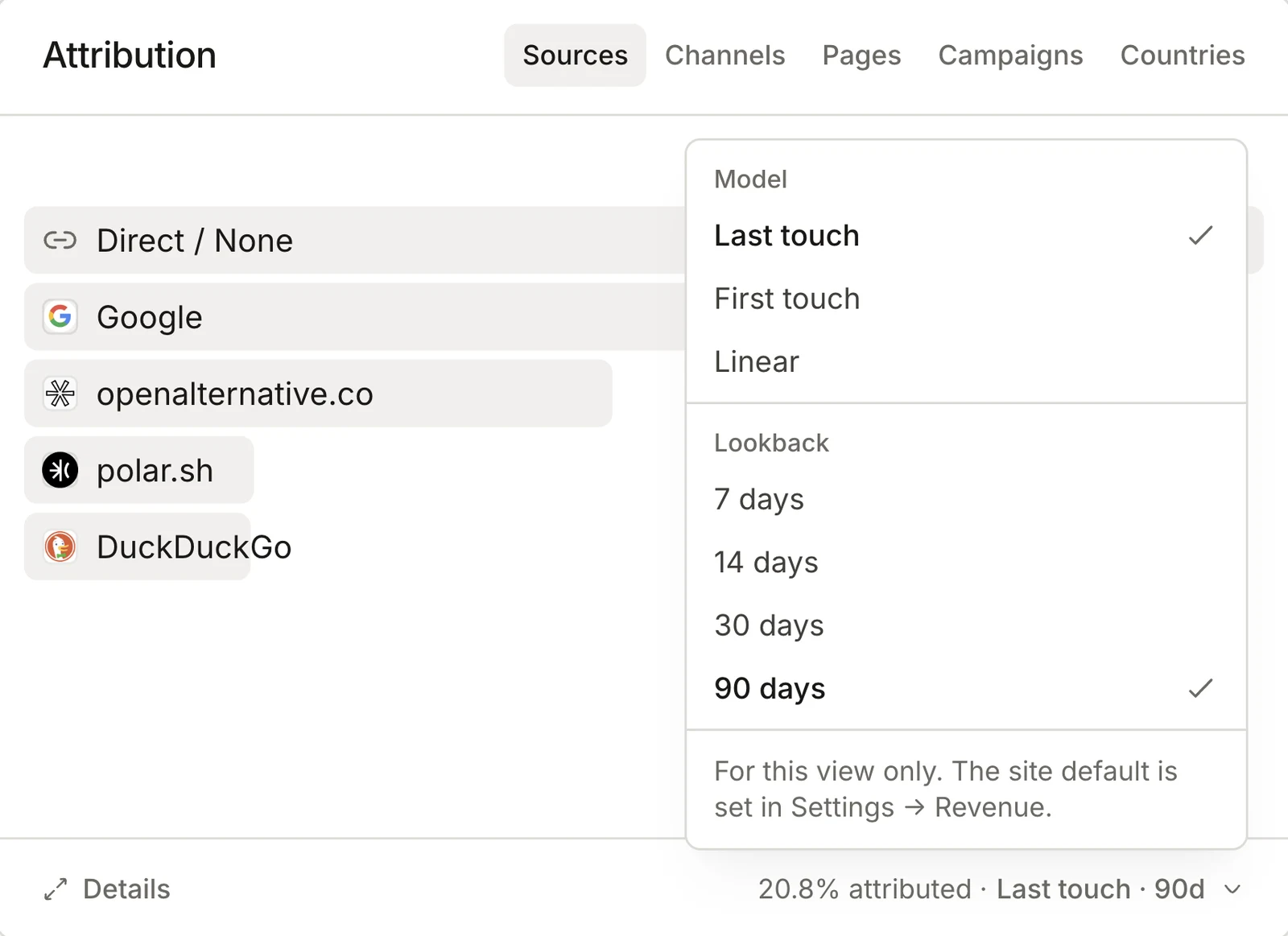
Your attribution figures changed with this release, because three rules now give credit further back. Past sales are worked out again under the new rules.
Direct gets credit only when every visit before a sale was direct. A trial user who found you through Google and paid after typing your address in now credits Google, under Last touch, First touch and Linear alike.
When you identify a buyer, all of their sessions inside the lookback count, on any device. First touch can now reach the visit that brought them in, weeks before they signed in.
The default lookback is 90 days, up from 30. New sites start there, and sites still on 30 moved to 90. You can change it in a site's Revenue settings, or try another value on the Attribution card for one view.
**Improvements**
- Tracker purchases, webhook sales and refunds convert at the exchange rate of their own day, so a delayed delivery stores the same amount.
- A Stripe dispute now comes off the order when the funds are withdrawn, and goes back on if they are reinstated. Add `charge.dispute.funds_withdrawn` and `charge.dispute.funds_reinstated` to a Stripe webhook connected earlier.
## The stats API moves to api.highseat.com
20 Oct 2026 · Install & API · https://highseat.com/changelog/public-api
`Terminal`
```
curl https://api.highseat.com/v1/sites/example.com/pages?limit=5 \
-H "Authorization: Bearer hs_live_…"
```
The stats API now has a host of its own. Every endpoint sits under `https://api.highseat.com/v1`, and every call is a read: a `GET` that answers JSON.
Create a key in Workspace settings, API keys. A key reads every site in the workspace, sites added later included, or only the ones you pick, and it belongs to the workspace, so it keeps working when the member who made it leaves.
### What you can read
Each site answers on its domain or its id. Ask for the overview figures, a time series, or a breakdown of pages, sources, devices, locations, campaigns, bots, events, goals or revenue. Realtime and funnels have endpoints too.
A breakdown pages with a cursor. Pass the `nextCursor` of one answer as `cursor` to get the next, up to 500 rows a page. A key can make 600 calls an hour, and every answer says how many are left in its `RateLimit` headers.
The spec is at `https://api.highseat.com/v1/openapi.json`, and an agent can read `https://api.highseat.com/v1/llms.txt`.
**Improvements**
- A new API key shows the base URL beside it, ready to copy.
- `GET /v1/usage` reports the workspace's events this period, its plan's limit and the projection to the end of the period, and it answers even while the workspace is locked.
- The docs have an API Reference tab with a page for every endpoint, generated from the OpenAPI spec, and a playground that sends real requests.
**Fixes**
- The old `/api/v1` paths on the dashboard's own origin are gone. Point every call at `https://api.highseat.com/v1`.
## Pick your platform, see only its install steps
16 Oct 2026 · Install & API · https://highseat.com/changelog/platform-picker
`app/layout.tsx`
```
import { Highseat } from "highseat/next"
export default function RootLayout({ children }: { children: React.ReactNode }) {
return (
{children}
)
}
```
Adding a site now starts with one question: what is the site built on? Pick from ten platforms, or Any other site, and Highseat shows only the steps for that one.
### Ten platforms, three groups
The picker sorts platforms by how the site is built. Website builders such as Webflow, Framer, Squarespace, Wix, Shopify and WordPress take one tag in their header settings or theme. Next.js, React and TanStack Start install the package, and Astro takes a script tag in its layout. Any other site covers the rest, and typing a name filters the list.
### One package for frameworks
Next.js, React and TanStack Start sites install `highseat` and render `` once, in the root layout. The package loads the tracker from Highseat or from your own proxy path. A call made before the tracker loads waits for it, and no call ever throws.
```sh file="Terminal"
npm install highseat
```
### The same code everywhere
Onboarding, Installation settings and [highseat.com/skill.md](/skill.md) read every snippet from one source, so a coding agent follows the same steps you see. A test fails when the dashboard shows code the package README does not.
**Improvements**
- Installation settings show when the first pageview arrived and when the proxy last sent an event.
- [highseat.com/skill.md](/skill.md) gives a coding agent the same install steps to follow.
**Fixes**
- Deleting a site or a user now removes every stored event. A failed erasure can be retried.
- Bot traffic reclassified after the fact no longer counts toward a plan's events.
## Identify signed-in users with a prop or a hook
15 Oct 2026 · Install & API · https://highseat.com/changelog/identify-signed-in-users
Pass the signed-in user's id to `` and the package calls `identify()` whenever it changes. `null` means signed out, so a sign-out or an expired session clears the id.
```tsx file="app/layout.tsx"
```
### From a hook
When the session comes from a client hook, call `useIdentify()` in any component instead. The root layout never reads the session, so a Next.js layout can stay static.
```tsx file="components/identify-user.tsx"
"use client"
import { useIdentify } from "highseat/next"
import { useSession } from "~/lib/auth-client"
export function IdentifyUser() {
const { data, isPending } = useSession()
useIdentify(isPending ? undefined : (data?.user.id ?? null))
return null
}
```
`undefined` means the session is still loading and changes nothing. `null` means signed out and clears the id.
**Improvements**
- In development, the package logs every `track()` and `identify()` call to the console, and warns once per page when no tracker script loaded. Pass `debug` to turn it on or off anywhere.
- An identified user id is kept in the browser for 13 months from the day it was set, then dropped. Identifying again with the same id doesn't extend it.
**Fixes**
- Funnels count a visitor's steps before and after `identify()` as one person.
- Sign-in and checkout hosts such as accounts.google.com and checkout.stripe.com fold into Direct instead of showing as sources.
- Revenue in Icelandic króna, Ugandan shillings and Malagasy ariary is stored at the right scale, from Stripe and from Polar.
## The highseat package, with a proxy on your own domain
14 Oct 2026 · Install & API · https://highseat.com/changelog/highseat-package
`app/api/highseat/route.ts`
```
import { createProxy } from "highseat/next"
const proxy = createProxy({ clientIp: "vercel" })
export { proxy as GET, proxy as POST }
```
`npm install highseat` gives a site everything it needs to talk to Highseat, typed. Render `` from `highseat/react` or `highseat/next`, or call `inject()` anywhere else. `track()` knows the built-in events, such as `signup` and `purchase`. Declare your own events, and in strict mode a misspelt event name fails the type check.
Calls made before the tracker loads wait for it, and no call ever throws.
### A proxy on your own path
`createProxy()` serves the tracker and forwards events from a path on your own domain, so a filter list that blocks Highseat's host doesn't block your site. It passes on each visitor's IP under your site secret, which keeps countries right, and Highseat drops the IP once it has looked up the country.
In Next.js, one route file holds the proxy and `withHighseat()` in `next.config.ts` points your proxy path at it. `highseat/proxy` has the same handler for any runtime with `fetch`, with guides for TanStack Start, Cloudflare Workers and Pages, Netlify, Vercel, Astro, Hono and nginx. Every test runs on Node, Bun and Cloudflare's workerd.
**Improvements**
- Server-side events sent with your site secret count as visits instead of being dropped.
- A 404 counts once per page path, and it is sent the moment the page loads.
## Share links show a preview when you paste them
14 Oct 2026 · Dashboard · https://highseat.com/changelog/share-link-previews
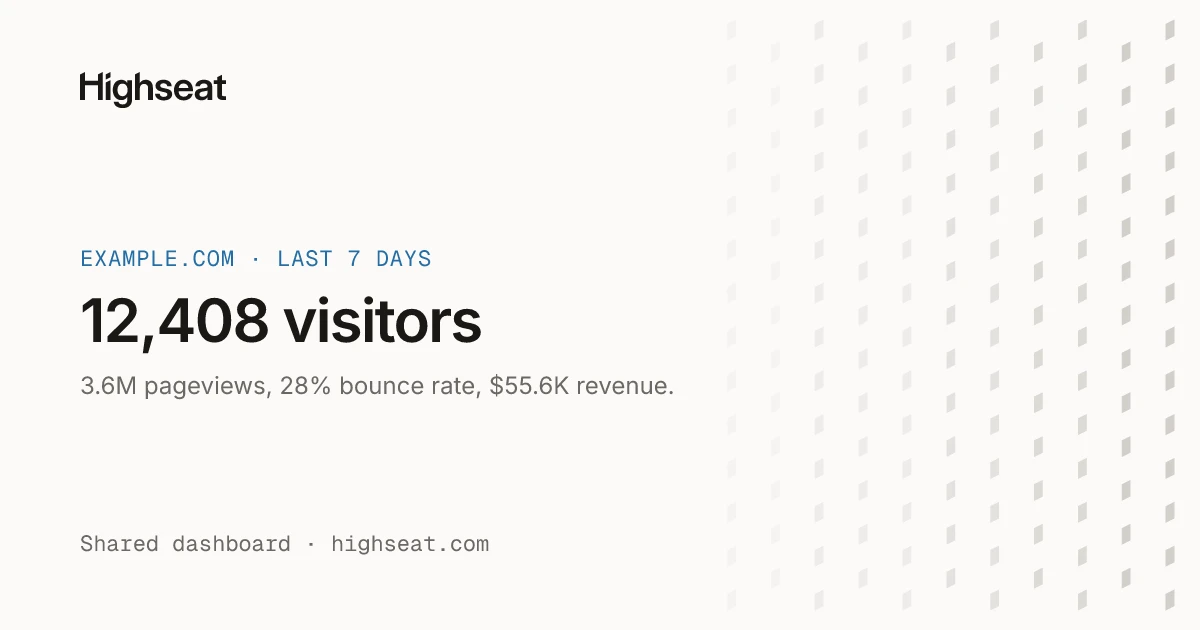
Paste a shared dashboard link into Slack, X or iMessage and it opens into a card: the site, the period, and its visitors, pageviews, bounce rate and revenue.
Revenue appears only when the link shows it. A link behind a password names the site and no figure.
**Fixes**
- The dashboard serves flags, browser logos and favicons itself, so no third party sees who views it.
- Traffic from HostRoyale's data centres now counts as bots.
- Server-side calls from Node, Bun and other backends count when they send the site secret, instead of being dropped as crawlers.
## Import your Plausible history
8 Oct 2026 · Data · https://highseat.com/changelog/plausible-import
Upload a Plausible export from a site's Data settings, and its daily totals show up in your reports next to the events Highseat collects.
One site can hold several imports. Each skips the days the site already tracked or imported, so overlapping exports never count the same day twice.
**Improvements**
- Exclude IP addresses and paths in site settings. Matching events are dropped at ingest, and one click adds your own IP.
## Goals, events and properties in one Actions card
4 Oct 2026 · Dashboard · https://highseat.com/changelog/actions-card

The dashboard now has one Actions card where three used to sit. Its Goals tab shows each goal's visitors, conversions and rate. Events lists every custom event, and Properties breaks an event down by the values it was sent with.
Click an event and the card filters the dashboard to it and opens its properties. Click a goal and every card shows the traffic that converted. The Goals tab appears once a site has its first goal.
### Goals from pages or events
Add a goal in a site's Goals settings. A page goal takes a path, and `*` is a wildcard: `/docs/*` counts every page under `/docs`. An event goal takes the exact event name. Both suggest the site's own pages and events as you type.
**Improvements**
- Goal and event rates count server-side visitors and leave out orders that arrive by payment webhook.
## Search, sort and list every site you track
30 Sep 2026 · Dashboard · https://highseat.com/changelog/all-sites
All sites now has a search field, a sort menu and a choice of grid or list. Press `/` to search. Every word you type has to appear in a site's name or domain, so `docs acme` finds docs.acme.com.
Sort by oldest or newest first, or by name in either direction. The list view puts each workspace in its own table, with the last 24 hours' visitors, the change against the 24 hours before, a sparkline, who is online and the date each site was added. Highseat remembers both choices.
On a phone the page keeps its cards, which fit a narrow screen better than a table.
**Improvements**
- Site cards show exact visitor counts instead of rounded ones.
- Your own workspace comes first, then the others by name, and an empty workspace shows a New site tile.
- The site switcher follows the order you pick on All sites.
- Every figure follows your browser's language, so a złoty amount reads 28,8 tys. zł in Polish and PLN 28.8K in English.
- Invite teammates as an Owner, Admin or Viewer, and leave a workspace from its Members page.
- Change your photo, name and email from Account, Profile. A new email applies once you open the link sent to it.
## Onboarding that waits for your first visitor
28 Sep 2026 · Dashboard · https://highseat.com/changelog/onboarding
Adding your first site now walks you through it. Name the site, add the snippet, and open your site in a new tab. The install step watches for your first pageview and switches to Now tracking the moment it lands, with where that first visitor came from, their browser and the page they opened.
You can skip to the dashboard at any point.
**Improvements**
- A site that has never reported opens its dashboard on the install steps.
- When events arrive from a host the site doesn't count, the install step names it, says how many came, and offers to allow it.
- Add more hostnames to a site in General settings. `*.example.com` counts example.com and every subdomain.
## Erase one user's data, or a whole workspace
28 Sep 2026 · Data · https://highseat.com/changelog/user-data-erasure
A site's Data settings have a Deletion card. Enter the user id your site sent with `identify()`, and Highseat removes every event recorded for that user, with the rest of each of their visits, anonymous pageviews from before they signed in included. The confirmation names how many events and visits go before anything is deleted.
The rows leave every report at once. Revenue on them goes too, and attribution credit is worked out again without them.
The workspace owner can also delete a whole workspace from its General settings, after typing its name. Billing stops, and every site's events, sessions, imports and exports go with it, along with its members and API keys.
**Improvements**
- Every card's Details dialog downloads its rows as CSV, and a full raw export of a site arrives by email link when it is large.
- A workspace that stops paying deletes its sites and their events on day 60, with a notice to the owner a week before. The workspace and its invoices stay.
## Sign in with Google or GitHub
24 Sep 2026 · Dashboard · https://highseat.com/changelog/google-github-sign-in
The sign-in and sign-up pages have a Continue with Google button and a Continue with GitHub button above the email form.
Already signed up with an email and password? Sign in as usual, then connect Google or GitHub in Account, Security. The same page lists every browser signed in to your account, so you can sign one out, or all of them but this one. Highseat won't let you disconnect your last way to sign in.
## See who is on your site, live
22 Sep 2026 · Dashboard · https://highseat.com/changelog/realtime

The Realtime page shows your site as it happens: a live dot map of where visitors are, a chart by the minute and a feed of events as they arrive.
**Improvements**
- A funnel's step breakdown shows each source's favicon.
- The Events page lists every event in order, with a detail dialog for each one.
## Funnels that show where visitors drop off
21 Sep 2026 · Dashboard · https://highseat.com/changelog/funnels
Build a funnel from two to eight steps on the new Funnels page. A step is a page, with `*` as a wildcard, or an event. Drag steps to reorder them, and pick how long a visitor has to finish, from one hour to 90 days. Count by visitors or by sessions.
The funnel's own page draws the steps as a ribbon, with each step's count and its drop-off. Under it, a breakdown by source, country and device shows which traffic converts. Click any row to filter the funnel to it, and change the period or add filters as you would on the dashboard.
## Revenue from Stripe and Polar, net of refunds
17 Sep 2026 · Revenue · https://highseat.com/changelog/revenue-attribution
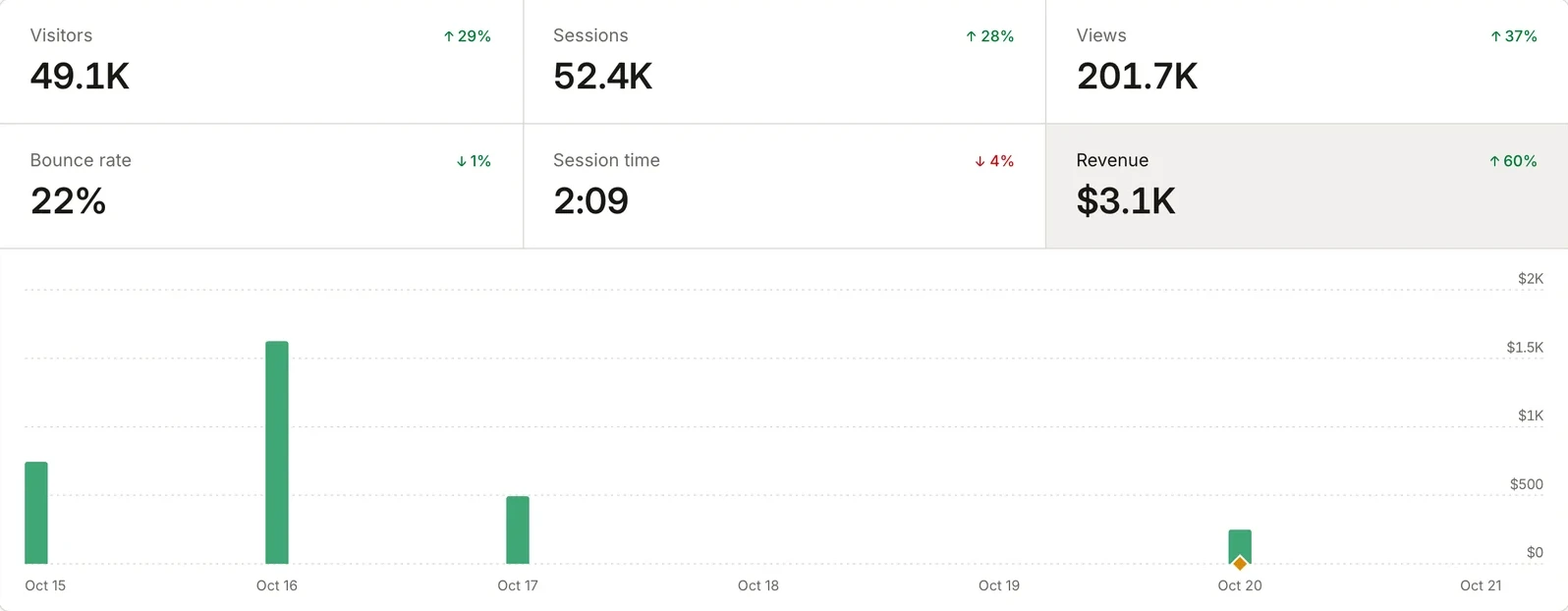
Connect Stripe or Polar with a webhook, and every sale lands in Highseat next to the visit that made it. The tracker gives each visit an attribution id. Pass it to your checkout as `attribution_id` metadata, and the payment joins the visit.
Revenue is net: a refund comes off the sale it belongs to. Every sale converts to the site's currency at the European Central Bank's rate on the day it was paid.
### Credit for the sale
A sale credits the visits that led to it, under Last touch, First touch or Linear attribution, within a lookback window. Credit is worked out when a report runs, so a change of model applies to past sales too. Mark your thank-you pages and they count as traffic but never take the credit.
The Revenue stat, the bars on the chart and the revenue column on every breakdown read the same figures, so Sources shows which referrer brought in the money, not only the visitors.
**Improvements**
- Revenue bars keep their full width when a comparison is on.
- Polar's `whsec_` webhook secrets are accepted as they come.
## Share a read-only dashboard with anyone
15 Sep 2026 · Dashboard · https://highseat.com/changelog/share-links
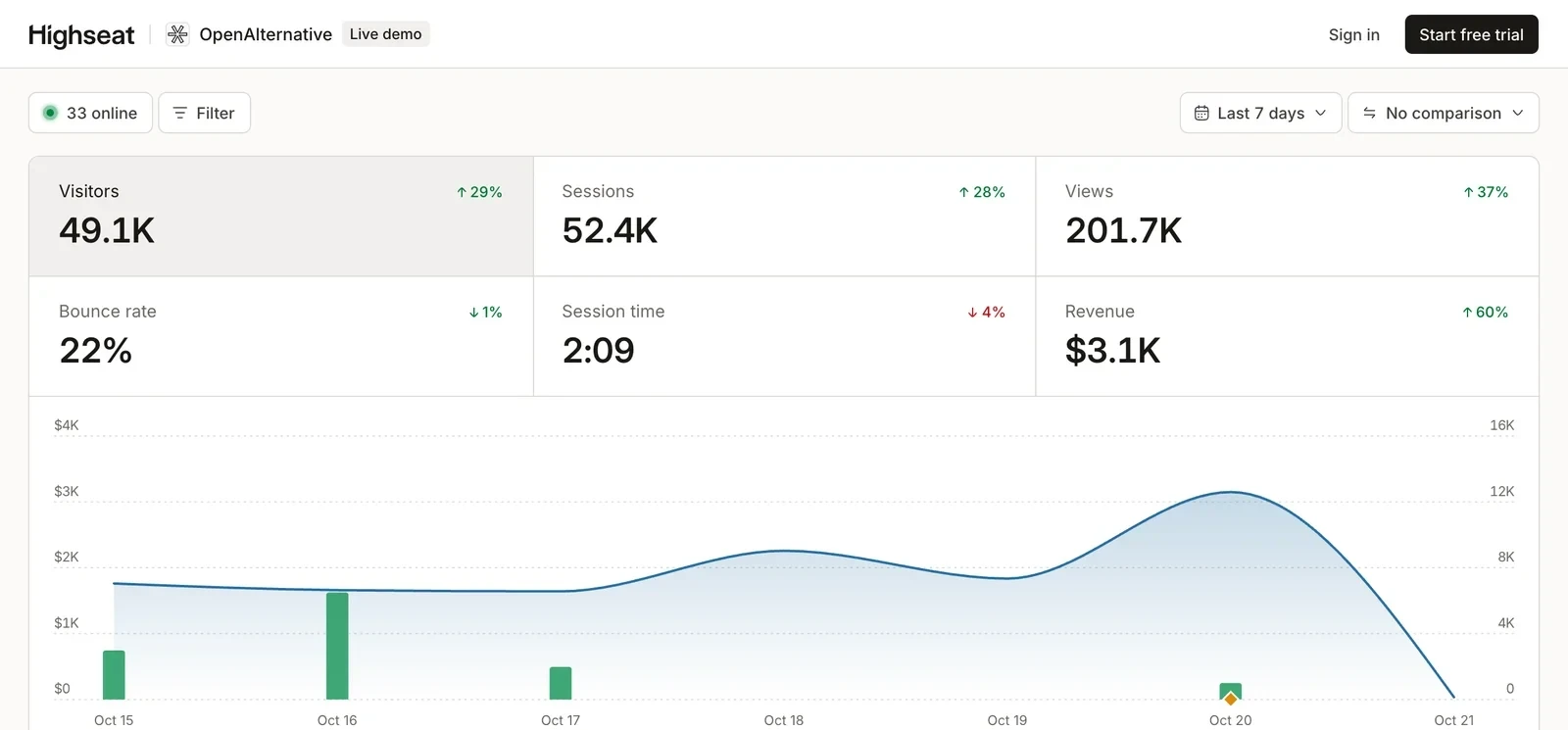
Create a share link in a site's Sharing settings and anyone with it can see the dashboard, with no account. They can change the period and filter, and they can't edit a thing.
Each link has its own rules. Ask for a password, let it expire at the end of a day, or limit it to a segment, such as one country or one campaign. Viewers can narrow a segment further but never widen it. Revenue and chart notes stay hidden unless you turn them on for that link.
A link without a password can be embedded with an iframe, in a light or dark theme. Delete a link and it stops working at once. Our own [live demo](/demo) is one of these links.
**Improvements**
- Build a filter from the toolbar with `F`, from pages, sources, locations, devices, UTM tags or events, with values taken from real traffic.
## Compare any period with the one before it
12 Sep 2026 · Dashboard · https://highseat.com/changelog/period-comparison
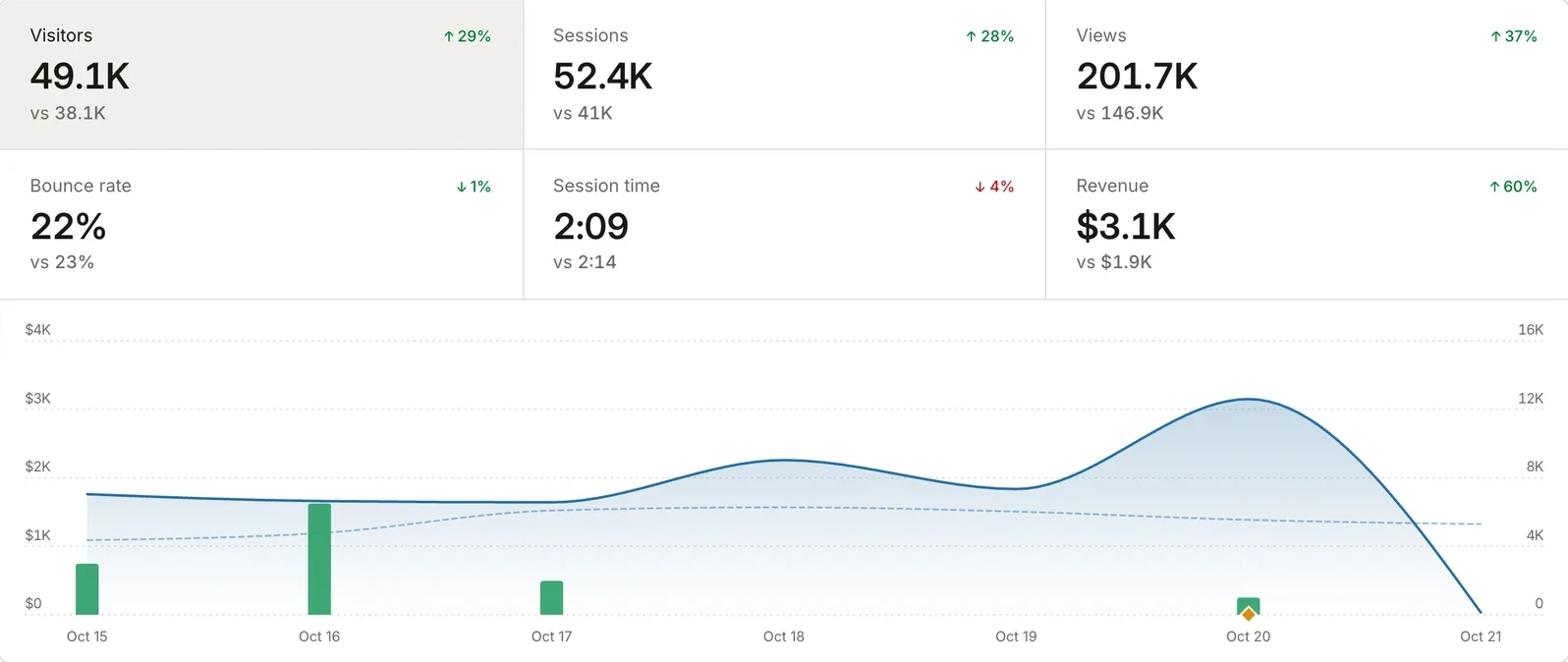
Pick Previous period, Year over year or a custom start day in the comparison menu, and every figure gets a vs line with the earlier value and the change. The chart draws the earlier period as a dashed line under the current one.
A comparison always covers as many days as the range you are looking at. All time has nothing before it, so it has no comparison.
### Click a row to filter
Every row in every card is a filter now. Click Google in Sources and the whole dashboard shows Google traffic, the chart included.
**Improvements**
- The Pages card has Entry, Exit and 404s tabs next to Top pages.
- Pin a note to a day on the chart, such as a launch or a price change, and it shows in that day's tooltip.
- Press `X` to turn the comparison on or off, and `Shift` + `?` to see every shortcut.
## Find broken links without touching your 404 page
11 Sep 2026 · Dashboard, Data · https://highseat.com/changelog/not-found-pages
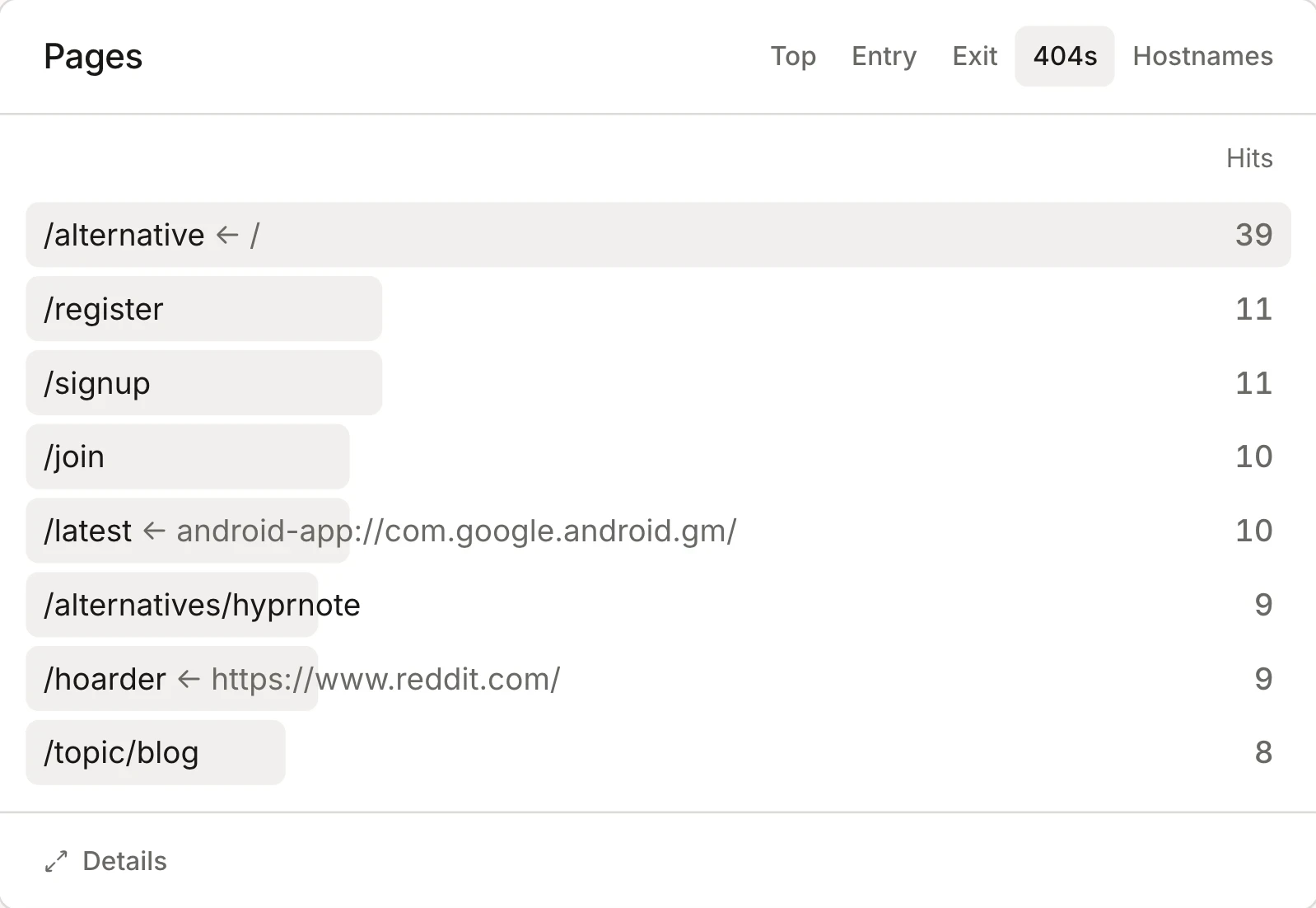
The 404s tab in the Pages card lists the missing URLs your visitors actually hit, with the page that most often sent them there. A link from your own site shows as a path, and a link from another site as its full address. That tells you whether to fix a link of yours or add a redirect for someone else's.
There's nothing to set up. When a visitor lands on a missing page, the tracker reads the 404 status from the browser and records it. No snippet in your 404 template and no goal to create. Chrome, Edge and other Chromium browsers report that status, while Safari and Firefox don't. So the counts run low, but one visit is enough to put a broken URL on the list.
A single-page app shows its not-found page without a new page load, so the tracker can't see a status there. Call `track("404")` from your not-found component instead.
## Bots stay out of your numbers
6 Sep 2026 · Data · https://highseat.com/changelog/bot-filtering
Highseat now keeps three kinds of automated traffic out of every report: hits from data centres, browsers driven by automation tools, and browsers claiming versions too old to be real. Data centres are matched by their network, so a headless browser on a cloud server is caught even when it looks like Chrome.
Filtered hits never reach your stats or your plan's event count. Highseat stores them apart, with only the time and the reason, so the dashboard can show how much it kept out and why.
Crawlers that announce themselves are left out too, as before.
**Improvements**
- A site's own first-party proxy is never mistaken for data centre traffic.